
What Is HiLight on Pixel 11 Pro XL? Google’s New LED Feature Explained
What Is HiLight on Pixel 11 Pro XL?
Remember when smartphones had tiny notification lights that quietly blinked whenever you received a message, missed a call, or needed to check your phone? Google appears to be bringing that basic idea back, but with a much more modern twist. HiLight is a new LED-based notification feature on the Pixel 11 Pro and Pixel 11 Pro XL that gives you visual information without requiring you to turn on the display or pick up the phone. Google says the feature uses colored LED lights positioned around the camera flash to provide timely, glanceable information while the phone is face down.
That may sound like a small addition compared with a new processor or a dramatically upgraded camera, but there is an interesting idea behind it. Modern smartphones constantly compete for our attention. A notification arrives, the screen lights up, you pick up the phone, and suddenly a quick glance becomes ten minutes of scrolling. HiLight is designed to give you just enough information to know something important happened without forcing you to look at a screen. At launch, Google says it can provide different light patterns for Gemini interactions and customized colors for incoming calls from important contacts. The company also says more capabilities are expected over time, including message notifications from favorite contacts.
Table of Contents
How the HiLight LED System Works
The easiest way to understand HiLight is to think of it as a smart notification light built into the Pixel’s camera area. Instead of placing a traditional LED somewhere near the display, Google has integrated colored LEDs around the camera flash on the back of the Pro models. When the phone is lying face down, those lights can glow or animate to communicate specific information. This means the phone can remain visually quiet from the front while still giving you a small clue about what’s happening.
Google is not presenting HiLight as a replacement for every conventional notification. It is more selective. The company’s initial examples focus on calls from favorite contacts and hands-free conversations with Gemini, with additional capabilities planned for the future. That limited approach is actually important because a notification light becomes annoying if it flashes constantly for every low-priority alert. HiLight seems intended to provide information at a glance rather than turn the back of the phone into another miniature notification screen. In other words, Google is trying to make the phone communicate with you without demanding your full attention.
Where Is HiLight Located on the Pixel 11 Pro XL?
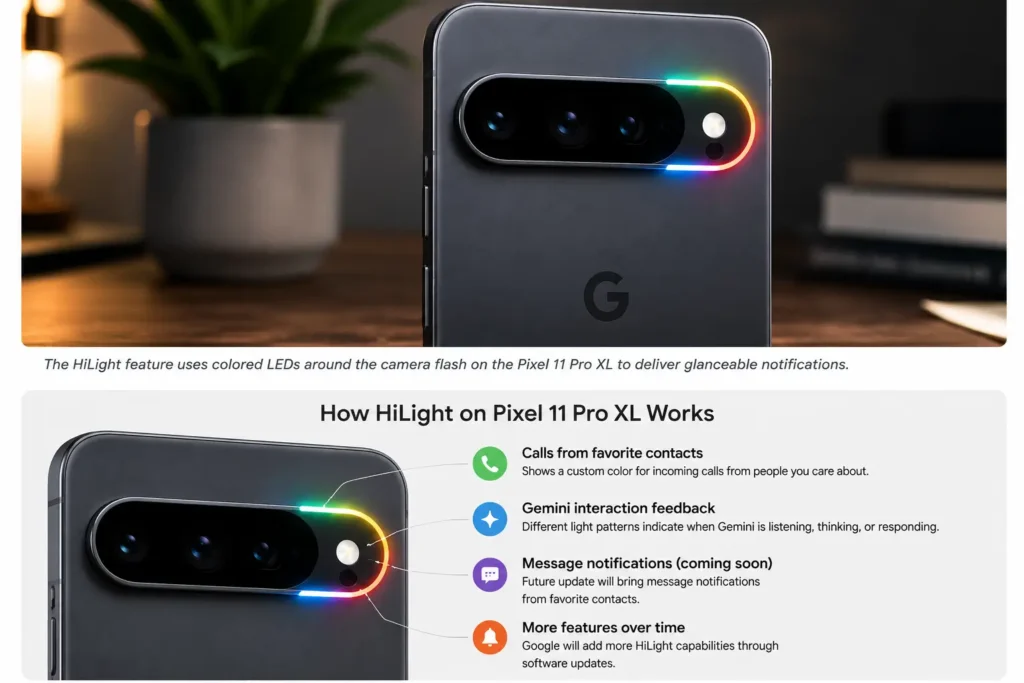
HiLight is built into the camera bar area of the Pixel 11 Pro XL rather than appearing as a separate light on the front or side of the phone. Google describes the system as colored LEDs positioned around the camera’s flash, allowing the lights to glow while the device is face down. The location is particularly interesting because it lets Google add a new feature without making the phone look like it has a traditional notification lamp stuck onto its exterior.
That placement also gives HiLight a distinctive visual identity. Instead of a tiny dot blinking in a corner, the light can produce colored patterns that are visible from across a desk or table. Reports from hands-on coverage describe it as an RGB LED notification system integrated into the Pro models’ camera area. The design makes sense from a practical perspective, too. When you put a phone face down, the camera bar becomes the part of the device facing upward, so the notification system can remain visible without turning the screen back on.
What Can HiLight Actually Do?
Here’s where the feature becomes more interesting—and also where expectations need to stay realistic. HiLight is not currently a full replacement for Android’s notification system. At launch, Google has highlighted a small number of use cases rather than promising that every app notification will trigger the LEDs. The company’s initial implementation focuses on important calls and Gemini interactions, while Google says additional capabilities will arrive over time.
That distinction matters because some people may hear “notification LED” and immediately imagine the old smartphone experience where every email, WhatsApp message, calendar reminder, and social-media alert produced a different blinking color. HiLight does not appear to work that way at launch. Instead, Google is treating the hardware as a new communication layer between you and the phone. It can tell you something meaningful is happening, but it does not necessarily tell you everything happening. That could ultimately make the feature more useful because fewer alerts mean less visual noise.
Calls From Favorite Contacts
One of the clearest examples is incoming calls from favorite contacts. Google says users can assign custom colors to people who matter most to them. That means you could potentially recognize who is calling simply by the color appearing from the back of your face-down Pixel 11 Pro XL, without immediately turning the device over.
Imagine your phone sitting on a conference-room table while you are working. Instead of the display suddenly lighting up and tempting you to check every notification, a particular color could tell you that an important person is calling. You can then decide whether the situation deserves your attention. It is a small interaction, but it fits Google’s broader attempt to make smartphones feel more helpful and less distracting. Whether users actually find it useful will depend heavily on how reliably the feature works and how much control Google eventually gives them.
How HiLight Works With Gemini
The connection between HiLight and Gemini is perhaps the most distinctly Google part of the feature. Google says that when you prompt Gemini hands-free, HiLight can use different patterns to indicate whether Gemini is listening, thinking, or responding. Instead of staring at the screen to determine what the assistant is doing, you can use the light as a simple visual status indicator.
That is an interesting direction because Google’s Pixel strategy increasingly revolves around AI being integrated into everyday phone interactions. The Pixel 11 series is powered by the new Tensor G6 processor and is designed around Gemini experiences, so HiLight fits into a larger hardware-and-software approach rather than being an isolated decorative feature. Think of it like a traffic signal for your AI assistant: one pattern tells you the conversation is being heard, another indicates processing, and another signals that Gemini is responding. You don’t need to stare at the display to understand what’s happening.
Visual Feedback While Gemini Is Listening and Responding
This could become particularly useful when you are using Gemini without holding the phone. If your Pixel is sitting on a desk, you could interact with the assistant while the device remains face down, and the light provides a visual confirmation that the phone understood the interaction and is working on a response. Google has positioned this as part of a broader effort to keep users connected without the distraction of screen notifications.
The idea is simple, but the execution will determine whether it becomes genuinely useful. If the light patterns are obvious and consistent, users can learn them quickly. If the animations are too subtle or difficult to distinguish, the feature could become something people notice once and then ignore. For now, Google’s approach suggests that HiLight is less about showing information and more about providing ambient feedback—a tiny visual conversation between the phone and its owner.
Can HiLight Show Text Messages?
This is one area where you should be careful about what the Pixel 11 Pro XL can do right now versus what Google says could arrive later. At launch, Google has specifically mentioned future HiLight capabilities such as message notifications from favorite contacts. That means the broader notification-light experience appears to be something Google intends to expand beyond the initial features.
So, if you are buying the Pixel 11 Pro XL specifically because you want every WhatsApp, SMS, Gmail, Instagram, or other app notification represented by a colored LED, you should not assume that functionality is available at launch. Current reporting also notes that the initial implementation is relatively limited, with more functionality expected in future updates. This is an important distinction for buyers because a feature can have exciting hardware today while its full software potential arrives months later.
Is HiLight Available on the Regular Pixel 11?
No—not according to Google’s launch information. HiLight is positioned as a feature for the Pixel 11 Pro and Pixel 11 Pro XL, rather than the standard Pixel 11. Google’s own announcement specifically describes HiLight in the section covering the two Pro phones.
That makes the feature one of the small hardware differences that separates Google’s premium models from the standard Pixel 11. The regular Pixel 11 still gets major upgrades of its own, including the Tensor G6 platform and camera improvements, but HiLight is part of the Pro experience. This could matter for buyers who are deciding between the regular and Pro models. A notification LED alone probably isn’t enough reason to spend more money, but if you already want the Pro’s camera, display, performance, and other features, HiLight becomes an interesting bonus.
Why Did Google Bring Back the Notification Light?
There is something almost nostalgic about HiLight. Before smartphones became dominated by edge-to-edge displays and software notifications, many phones used small LEDs to communicate status. You could glance at a device and immediately know whether you had missed a call or received a message. Google appears to be revisiting that concept for an era when smartphones are more powerful—and arguably more distracting—than ever.
The difference is that HiLight is not simply copying an old notification LED. Google has combined the concept with RGB lighting, camera hardware, Gemini interactions, and customizable contacts. The result is closer to an ambient notification system than the simple blinking indicators found on older phones. Google explicitly frames HiLight around staying informed without having to look at the screen, which fits the company’s broader design goal of keeping people connected while reducing unnecessary distraction.
HiLight vs Traditional Smartphone Notification LEDs
The basic idea is similar, but the experience could be quite different. Traditional notification LEDs were generally tiny, passive indicators. They blinked in a particular color depending on what happened, and their capabilities were mostly determined by software rules. HiLight uses a more prominent position around the camera flash and is capable of colored patterns rather than just a single blinking dot. Current hands-on reporting describes the Pixel 11 Pro’s system as an RGB LED notification ring.
| Feature | Traditional notification LED | Pixel 11 Pro XL HiLight |
|---|---|---|
| Location | Usually near the display | Around the camera flash |
| Colors | Often limited | RGB/color-based |
| Face-down visibility | Usually limited | Designed for face-down use |
| Gemini feedback | No | Yes |
| Favorite-contact colors | Device-dependent | Supported |
| Message notifications | Often supported | More capabilities planned |
| Animation/patterns | Usually basic | More expressive |
| Main purpose | General notifications | Glanceable, selective information |
The biggest difference may actually be philosophical. Older notification LEDs were designed to tell you something happened. HiLight is being designed to tell you something worth noticing happened, while keeping the phone screen out of the interaction.
Does HiLight Work When the Phone Is Face Down?
Yes. In fact, the face-down scenario is one of the central reasons Google created HiLight. When the Pixel 11 Pro XL is placed screen-down, the display is naturally hidden, but the camera bar remains visible. The LEDs can therefore provide a visual signal without requiring the screen to illuminate.
That makes the feature particularly suited to desks, dining tables, bedside surfaces, and workplaces where you may intentionally place your phone face down. Instead of constantly flipping the device over to check whether something important happened, you can use the light as a quick cue. The important part is that you still have the choice to ignore it. The phone can remain face down, your screen can remain off, and you can decide whether the signal is worth your attention.
Can You Customize HiLight Colors?
Google has confirmed that custom colors can be assigned to favorite contacts for incoming calls. This is one of the more personalized parts of HiLight because the color itself can become a visual identity for a particular person.
For example, you might associate one color with a family member and another with an important work contact. After using the system for a while, you could potentially recognize the caller without touching the phone. However, it is important not to overstate the current customization options. Google has not presented HiLight as an endlessly configurable lighting system where users can assign colors to every application and notification type. The initial feature set is deliberately narrower.
Is HiLight Useful or Just a Gimmick?
That depends on how you use your phone. If your smartphone is normally in your hand, the screen is always visible, and you rarely place it face down, HiLight may not change your life. You could look at the display and get much more information than a colored light can provide. In that situation, the feature might feel like a clever piece of hardware that you quickly forget about.
But for people who intentionally put their phones face down, the story is different. HiLight can provide information without turning the screen into an invitation to interact. That is arguably its strongest selling point. You do not need to know the full contents of a notification; you only need to know whether something important happened. Google’s approach could therefore appeal to people who want fewer screen interruptions without becoming completely unreachable.
The feature also has room to grow. Google says additional capabilities are planned, including message notifications from favorite contacts. If Google expands HiLight thoughtfully, it could become a genuinely useful part of the Pixel experience rather than a novelty.
Will Google Add More HiLight Features?
Google has already indicated that more HiLight capabilities are coming. The company’s announcement specifically mentions future support for message notifications from favorite contacts. That suggests Google views the hardware as a platform that can become more capable through software updates.
This is one of the most interesting things about HiLight. The hardware is already in the phone, so Google does not necessarily need to redesign the device to add new use cases. Future Pixel software updates could potentially make the LEDs more useful, although the exact roadmap beyond Google’s stated plans should not be treated as confirmed. Early reporting has also emphasized that the feature is relatively limited at launch.
For Pixel owners, that creates an interesting wait-and-see situation. HiLight could remain a small feature used primarily for calls and Gemini, or Google could gradually turn it into a broader notification system. The latter would make the hardware considerably more valuable.
Pixel 11 Pro XL HiLight and Privacy
There is another subtle benefit to this approach: less information needs to appear on the screen. A traditional notification can reveal a sender, message preview, app icon, or other details when your phone lights up. HiLight can communicate something much simpler, such as the identity of an important caller through a chosen color.
That does not automatically make HiLight a privacy feature, and users should not assume that a light signal can never reveal information to someone nearby. Still, the basic concept reduces the amount of content displayed publicly. Instead of your screen showing a message preview while the phone sits on a table, a small visual cue can simply tell you that something happened. That aligns nicely with the broader idea of glanceable information without unnecessary exposure.
What Makes HiLight Different From an Always-On Display?
An Always-On Display and HiLight solve different problems. An Always-On Display keeps information available on the screen, often showing the time, notification icons, battery status, or other small pieces of information. HiLight does not attempt to display text or detailed information. Instead, it uses light as a quick signal from the back of the phone.
The distinction becomes particularly obvious when the phone is face down. The Always-On Display becomes invisible, while HiLight can continue communicating through the camera area. That is why the two features can actually complement each other rather than compete. One is designed for glanceable screen information, while the other is designed for glanceable physical feedback.
Which Pixel Phones Get HiLight?
Google’s launch information identifies HiLight as a feature of the Pixel 11 Pro and Pixel 11 Pro XL. The standard Pixel 11 does not receive the feature according to the current launch materials.
Google’s Pixel 11 Pro Fold also has a HiLight implementation around its camera system, although that device is a separate foldable product with its own hardware design. Google says its HiLight system uses LEDs around the camera’s flash for glanceable information, including favorite-contact calls and hands-free Gemini interactions.
For the specific topic of this article, though, the key point is simple: if you want HiLight on a conventional Pixel phone, the Pixel 11 Pro and Pixel 11 Pro XL are the models to look at.
Should You Buy the Pixel 11 Pro XL for HiLight?
Probably not by itself. HiLight is interesting, but a notification light should not be the deciding factor behind a premium smartphone purchase. The Pixel 11 Pro XL has a much broader set of upgrades, including Google’s Tensor G6 processor, enhanced camera hardware, a brighter display, faster charging, and expanded Gemini experiences. Google says the Pro models feature displays reaching up to 3,600 nits and improved camera hardware, while the Pixel 11 generation is built around Tensor G6 and Gemini.
Instead, think of HiLight as one piece of the overall Pixel experience. If you already want the Pro XL because of its cameras, display, performance, and AI capabilities, HiLight adds another layer of convenience. It is especially appealing if you often keep your phone face down or want to reduce how frequently you turn on the screen.
The more important question is what Google does with the feature next. The hardware is now there. If future updates add useful message alerts, richer customization, and more intelligent notification patterns, HiLight could become one of those Pixel features that seems small on paper but becomes surprisingly difficult to live without.
Final Verdict: Is Google’s HiLight Feature Worth It?
HiLight is one of the more unusual additions to the Pixel 11 Pro XL. It does not increase the phone’s camera megapixels or make its processor dramatically faster, but it tackles a very everyday problem: how to know whether your phone needs your attention without constantly looking at it.
Google has taken the old notification-light concept and redesigned it around the modern smartphone. The LEDs sit around the camera flash, they can use colors and patterns, they work while the phone is face down, and they connect to features such as favorite-contact calls and Gemini interactions. Google also says the feature will gain additional capabilities over time, including message notifications from favorite contacts.
At launch, HiLight is still more of an interesting beginning than a finished notification ecosystem. Current coverage points out that its initial capabilities are limited, so buyers should not expect it to replicate every notification LED feature from older phones immediately.
Still, the concept makes sense. Smartphones have spent years becoming better at grabbing our attention. HiLight takes a different route: give us just enough information to decide whether we need to pay attention. If Google continues developing that idea, the tiny lights hidden around the Pixel 11 Pro XL’s camera could become much more important than they initially appear.
FAQs
What is HiLight on the Pixel 11 Pro XL?
HiLight is a new LED-based notification feature on the Pixel 11 Pro and Pixel 11 Pro XL. Colored LEDs around the camera flash provide visual signals while the phone is face down, including alerts for calls from favorite contacts and visual feedback during Gemini interactions.
Does the Pixel 11 Pro XL have a notification light?
Yes. The Pixel 11 Pro XL includes Google’s new HiLight LED notification system. Unlike older notification LEDs, HiLight is integrated around the camera flash and can use colored light patterns for supported notifications and interactions.
Can HiLight display message notifications?
Google says additional HiLight capabilities are planned, including message notifications from favorite contacts. However, users should not assume that every messaging app or notification is supported at launch.
Does HiLight work with Gemini?
Yes. Google says HiLight can provide different visual patterns when you interact with Gemini hands-free, indicating stages such as listening, thinking, and responding.
Is HiLight available on the regular Pixel 11?
Google’s launch information places HiLight on the Pixel 11 Pro and Pixel 11 Pro XL, rather than the standard Pixel 11. The feature is therefore one of the additions associated with Google’s Pro models.