

If you run a website — any website — on WordPress, Drupal, Joomla, or virtually any other platform built on PHP, you need to read this.
Not eventually. Right now.
On October 21, 2026, security researchers publicly disclosed two critical vulnerabilities in PHP — the programming language that quietly powers approximately 70% of every website on the internet. The vulnerabilities are collectively called PHP2Shell, and they are serious enough that the NSA issued a direct warning to website operators, governments pulled their own sites offline to apply emergency patches, and cybersecurity agencies across the US and Europe went on high alert.
This is not a routine security update. Researchers are comparing PHP2Shell to Heartbleed — the 2014 vulnerability that shook the internet’s foundations — and to Log4Shell, the 2021 incident that left millions of systems exposed for months. The difference this time is that artificial intelligence found and weaponised these flaws faster than any human team could have managed, which changes the urgency of the response timeline significantly.
Here is everything you need to know — what PHP2Shell actually is, whether your website is affected, and exactly what to do about it.
What Is PHP2Shell? The Plain English Explanation
PHP is the programming language running underneath most of the websites you visit every day. When you load a WordPress blog, book a hotel through a PHP-based booking system, or log into a forum running on Drupal — PHP is executing the code that makes all of that happen. It has been the backbone of the web for decades, which is precisely why a flaw in PHP itself is such a significant event. It is not a problem with one website or one application. It is a problem with the foundation everything is built on.
PHP2Shell is the name given to two critical vulnerabilities discovered in PHP’s core engine — tracked as CVE-2026-109618 and CVE-2026-109619, each carrying a CVSS severity score of 9.2 out of 10. Both vulnerabilities are memory-safety issues that stem from how PHP handles fatal errors — specifically out-of-memory errors — while processing web requests.
In plain terms: when PHP encounters certain types of errors during a request, it can leave corrupted internal data behind without cleaning it up properly. A subsequent request handled by the same server worker can then pick up and use that corrupted data — and a skilled attacker can engineer this sequence deliberately to take control of the server entirely.
The technical term for what this enables is Remote Code Execution (RCE) — meaning an attacker can run their own code on your server without ever having a legitimate login or access credential. They do not need your password. They do not need to guess anything. They just need your server to be running a vulnerable version of PHP.
What makes this particularly alarming is that the vulnerability lives at the PHP engine level, below the application layer. That means it does not matter how secure your WordPress installation is, how strong your passwords are, or how carefully your developer wrote your application code. If your server is running a vulnerable PHP version, the door is open regardless.
How Serious Is This, Really?
The honest answer is: very serious — but also very fixable if you act quickly.
Here is the scale of the problem. PHP powers an estimated 70% of all websites in the world. That includes WordPress — which alone runs approximately 43% of all websites on the internet — plus Drupal, Joomla, MediaWiki (which runs Wikipedia), and countless custom-built platforms. Palo Alto Networks identified over 22.6 million potentially vulnerable exposed instances globally based on their own telemetry at the time of disclosure.
Researchers at Wiz demonstrated working pre-authentication RCE — meaning attacks that require zero credentials — against the latest container images of WordPress, Drupal, and Joomla simultaneously. This is not a theoretical risk or a proof of concept that requires specific conditions. It was demonstrated against default installations running the most current software, with the only variable being the underlying PHP version.
Beyond taking control of a server, the vulnerabilities also enable attackers to read the server’s process memory — which can contain passwords, authentication tokens, API keys, and cryptographic certificates belonging to other users’ requests being processed simultaneously. This is the Heartbleed comparison: not just a way in, but a way to silently extract sensitive data from traffic you should never be able to see.
How AI Found What Humans Missed for a Decade

This part of the story deserves its own attention because it signals something important about where cybersecurity is heading.
The vulnerable code had been present in PHP since version 5.4 — first released over a decade ago. The flaws were not introduced recently. They were not the result of a careless update. They were deep architectural bugs that survived years of human code review, security audits, and penetration testing without being detected as exploitable.
Two independent teams found them almost simultaneously in August 2026 — Wiz Research using their own AI-powered security platform alongside Google’s Gemini 4 Argon and OpenAI’s GPT-5.6 Sol, and separately a researcher at the firm Calif using GPT-5.6 Sol through OpenAI’s “Patch the Planet” initiative. Both teams arrived at the same vulnerabilities within days of each other, which suggests these were not the result of unusually inspired researchers having a lucky breakthrough — they were the inevitable output of AI systems systematically analysing code at a depth and speed that human teams cannot practically replicate.
What AI changed was not the existence of the bug. It was the ability to chain together multiple subtle flaws, understand how PHP allocates and reuses memory across requests, and build a working exploit that accounts for the enormous variation in PHP configurations, versions, and deployment environments. That kind of work would previously have required a world-class team of security researchers working for months. The AI systems completed it in under a week.
This is why AI safety concerns are escalating even among the researchers building these tools. AI is compressing the timeline between vulnerability existence and active exploitation — dramatically.
Crucially, the same capability that found this vulnerability also helped fix it. The AI teams contributed to patch development and verification, working with the PHP Foundation to ensure the fix addressed not just the four specific bugs they had found but the underlying architectural pattern responsible for all of them.
Which PHP Versions Are Affected?
Every PHP version released in the last decade is affected by at least one of the two vulnerabilities. Specifically:
Affected: PHP 5.4 through PHP 8.5 (pre-patch)
Patched versions (safe to use):
- PHP 8.5.12
- PHP 8.4.27
- PHP 8.3.36
- PHP 8.2.35
If you are running any PHP version lower than these patched releases — including any version in the 5.x, 7.x, or early 8.x series — you are vulnerable.
One additional note worth flagging: PHP 8.2 will reach end of life on December 31, 2026, and PHP 8.3 on December 31, 2027. While both have received this emergency security patch, the PHP team recommends targeting PHP 8.4 or 8.5 for any new deployments or migrations, as older branches will eventually stop receiving security fixes entirely.
Is My WordPress Site Affected?
Almost certainly yes — if your hosting environment has not already updated PHP for you.
WordPress itself is not the vulnerable party here. The WordPress application code is fine. The issue is the PHP version your hosting server uses to run WordPress. The same applies to Drupal, Joomla, WooCommerce, and any other PHP-based platform.
Wiz Research specifically confirmed pre-authentication RCE against WordPress using the latest container images at the time of testing — meaning a default, fully updated WordPress installation was vulnerable purely because of the underlying PHP engine.
The good news is that many major hosting providers — including Cloudflare, AWS, Google Cloud, Microsoft Azure, Automattic (WordPress.com’s parent company), Fastly, Akamai, and Vercel — deployed emergency Web Application Firewall (WAF) mitigations ahead of public disclosure and have since been rolling out PHP updates for managed hosting environments. If you are on managed WordPress hosting from a major provider, your server may already be patched.
If you are on shared hosting, a VPS, or any environment where you manage your own PHP version — you need to check and act yourself.
How to Check If Your Website Is Affected
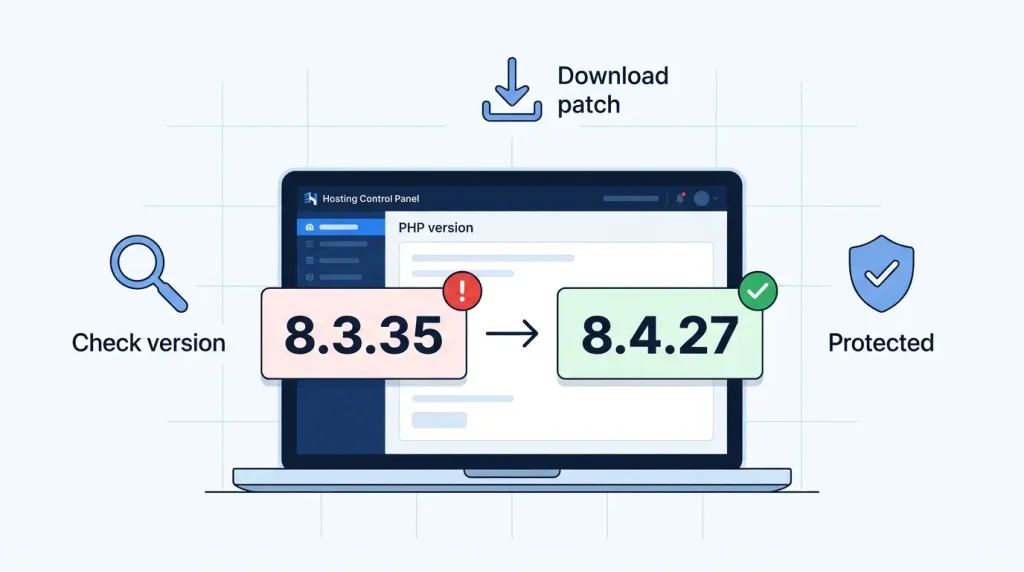
There are three ways to check your current PHP version, depending on how you access your hosting:
Method 1 — WordPress Dashboard (easiest)
Log into your WordPress admin → go to Tools → Site Health → Info tab → expand the “Server” section. Your PHP version is listed there. Compare it against the patched versions above. If it is lower than 8.2.35, 8.3.36, 8.4.27, or 8.5.12, your site is currently vulnerable.
Method 2 — Hosting Control Panel
Log into your hosting control panel (cPanel, Plesk, DirectAdmin, or your host’s custom panel). Look for a section called PHP Version, PHP Manager, or MultiPHP Manager. Your current PHP version and the available versions will be listed there. Most control panels let you switch versions from the same screen.
Method 3 — Contact your hosting provider
If you are unsure which control panel you have or cannot locate the PHP settings, contact your hosting provider’s support directly and ask: “What PHP version is my account currently running, and has it been patched for CVE-2026-109618 and CVE-2026-109619?” Any competent hosting support team will be able to answer this immediately and guide you through the update process.
How to Fix It — Step by Step
If your site is on vulnerable PHP, here is exactly what to do:
Step 1 — Back up your site first
Before changing any server configuration, take a full backup of your WordPress files and database. Most hosting control panels have a one-click backup option. If you use a WordPress backup plugin like UpdraftPlus or Jetpack Backup, run a manual backup right now. This takes five minutes and protects you if anything goes wrong during the update.
Step 2 — Update PHP through your hosting panel
In your hosting control panel → PHP Manager → select your domain → change the PHP version to 8.4.27 (recommended) or 8.3.36 at minimum. Click Save or Apply. The change typically takes effect within seconds to a few minutes.
Step 3 — Test your website immediately after
Visit your website, click through several pages, and test any critical functionality — contact forms, checkout processes, login pages. PHP version changes can occasionally cause plugin compatibility issues. If something breaks, you can temporarily revert to your previous PHP version while you investigate, then address the compatibility issue before updating again.
Step 4 — Update WordPress, themes, and plugins
While you are in maintenance mode, run all pending WordPress core, theme, and plugin updates. This is good practice after any server-level change and ensures your site is fully hardened, not just patched at the PHP level.
Step 5 — Verify the patch
Return to WordPress → Tools → Site Health → Server and confirm your PHP version now shows the updated number. You can also visit the free tools page for additional website security resources.
What If You Cannot Update PHP Immediately?
Not every hosting environment allows instant PHP version switching. If you are on a legacy managed server, a corporate hosting environment with change control processes, or a platform where updates require a support ticket — there are interim mitigations while you arrange the full patch.
Web Application Firewall (WAF): Cloudflare deployed temporary WAF rules to block PHP2Shell exploitation attempts even on unpatched servers. If your site is behind Cloudflare’s free plan, enable the WAF rules in your Cloudflare dashboard → Security → WAF → toggle on. This is a stopgap, not a replacement for patching, but it reduces your exposure while you wait.
Disable file uploads temporarily: CVE-2026-109618 specifically involves PHP’s session upload-progress handling during multipart request processing. If your site does not require file uploads, temporarily disabling the upload functionality removes one exploitation surface while you prepare the full patch.
Contact your host urgently: If your hosting provider has not yet patched the server-level PHP and does not give you a tool to do it yourself, escalate. This is a CVSS 9.2 critical vulnerability. Any competent hosting provider is actively working on this.
The Bigger Picture — What PHP2Shell Tells Us About AI and Security
It would be easy to read PHP2Shell as purely a PHP story — a programming language with bugs that got found and patched. But the more significant thing about this incident is what it reveals about how the security landscape is changing.
AI news coverage has been full of stories about AI as a productivity tool, a creative assistant, a customer service agent. PHP2Shell is a reminder that AI is also a research tool of extraordinary power — and that cuts both ways.
Vulnerabilities that survived a decade of human scrutiny fell to AI analysis in a week. That is the researcher side of the equation. On the attacker side, the same AI capabilities that allowed Wiz and Calif to build working exploits in days will eventually be available to malicious actors who are not operating under responsible disclosure frameworks or coordinating with the PHP Foundation.
The period between vulnerability discovery and active widespread exploitation is compressing. What used to be months is now weeks. What used to be weeks may soon be days. How to check if an image is AI-generated using AI detection tools reflects the same dynamic in the content world — AI changes what is practically achievable, on both sides of every security boundary.
The response to PHP2Shell — AI-assisted discovery, coordinated disclosure, rapid patching, and industry-wide collaboration between Cloudflare, AWS, Google, Microsoft, and dozens of others — represents the defensive side of that equation working well. But it worked well this time because the researchers who found the bug chose the responsible path. That will not always be the case.
For now, the important thing is practical and immediate: check your PHP version, apply the patch, and keep your site updated. The broader questions about AI and security are ones the industry will be working through for years.
Frequently Asked Questions
What is PHP2Shell?
PHP2Shell is the name given to two critical security vulnerabilities — CVE-2026-109618 and CVE-2026-109619 — discovered in the PHP programming language’s core engine in August 2026 and publicly disclosed on October 21, 2026. They allow attackers to remotely execute code on a vulnerable server without any login credentials, affecting every PHP version from 5.4 through 8.5 prior to the emergency patches released on October 21.
Is my WordPress site vulnerable to PHP2Shell?
What is PHP2Shell?
PHP2Shell is the name given to two critical security vulnerabilities — CVE-2026-109618 and CVE-2026-109619 — discovered in the PHP programming language’s core engine in August 2026 and publicly disclosed on October 21, 2026. They allow attackers to remotely execute code on a vulnerable server without any login credentials, affecting every PHP version from 5.4 through 8.5 prior to the emergency patches released on October 21.
Is my WordPress site vulnerable to PHP2Shell?
Yes, if your hosting server is running an unpatched version of PHP. WordPress itself is not the vulnerability — the issue is in the underlying PHP engine that WordPress runs on. Check your PHP version in WordPress → Tools → Site Health → Server. If it is below 8.2.35, 8.3.36, 8.4.27, or 8.5.12, update immediately through your hosting control panel.
Which PHP versions are safe after the PHP2Shell patch?
The patched safe versions are PHP 8.5.12, 8.4.27, 8.3.36, and 8.2.35. Any PHP version below these, including all versions in the 5.x and 7.x series, remains vulnerable. The PHP team recommends upgrading to PHP 8.4 or 8.5 for the longest security support window.
How do I update PHP on my WordPress website?
Log into your hosting control panel (cPanel, Plesk, or your host’s custom panel) → find PHP Manager or MultiPHP Manager → select your domain → change the PHP version to 8.4.27 or higher → save. Then test your website to confirm everything works correctly. If you cannot find this setting, contact your hosting provider’s support directly.
Has my hosting provider already patched PHP2Shell?
Major managed hosting providers including Cloudflare, AWS, Google Cloud, Microsoft Azure, Automattic, Fastly, and Vercel deployed emergency mitigations and have been rolling out patches. If you are on shared or managed WordPress hosting with one of these providers, your environment may already be protected — but verify your PHP version directly rather than assuming.
What can an attacker do with the PHP2Shell vulnerability?
An attacker can remotely execute their own code on your server without any credentials — meaning they can deface your website, steal your database, install malware, access files, and extract sensitive data including passwords and API keys from server memory. CVE-2026-109618 also enables reading other users’ request data from server memory without achieving full code execution, similar to the Heartbleed vulnerability from 2014.
Who discovered PHP2Shell?
Two independent teams discovered the vulnerabilities in August 2026. Wiz Research found them using their Wiz Atlas platform alongside Google’s Gemini 4 Argon and OpenAI’s GPT-5.6 Sol AI models. Separately, a researcher at the firm Calif discovered them using GPT-5.6 Sol through OpenAI’s Patch the Planet initiative. Both teams reported to the PHP security team and participated in coordinated disclosure.
Is this as serious as Heartbleed or Log4Shell?
Security researchers are drawing comparisons to both. Like Heartbleed, PHP2Shell enables memory disclosure that can expose sensitive data from other users’ requests. Like Log4Shell, it affects infrastructure that runs underneath many other applications and platforms. The CVSS score of 9.2 — close to the maximum of 10 — reflects the severity of the potential impact combined with the ease of exploitation on unpatched systems.
Sources: Wiz Research (wiz.io/blog/php2shell-php-rce); Patchstack Security Advisory (patchstack.com); Palo Alto Networks Unit 42 Threat Brief; TechRadar; Axios; CNBC; Wikipedia PHP2Shell entry; PHP Foundation blog.